UE5 Editor Plugin — Mesh to Control Rig
AutoRig AI
An Unreal Engine 5 editor plugin that takes a static or skeletal mesh and generates a usable Control Rig in the editor: skeleton, skin weights, IK Rig, retarget chains, and a Control Rig graph. IK features are checkboxes. FK is an option, not a default you have to undo.
A live preview viewport sits next to the panel. Markers drop onto the mesh for joints the automatic pass should not guess — fingers, toes, extra limbs. The pipeline can start from a static mesh (full skeleton + weights + rig) or skip straight to IK Rig and Control Rig when the mesh is already skinned.
The work is C++ for mesh conversion, skeleton construction, and the Slate editor, with Python for Control Rig graph generation. Humanoid is the shipped path. Creature, quadruped, mechanical, and vehicle templates are in the plugin and not the demo videos.
Gallery
IK/FK controls and twist joints generated on a skeletal mesh
IK spine and Aim control after AutoRig generation
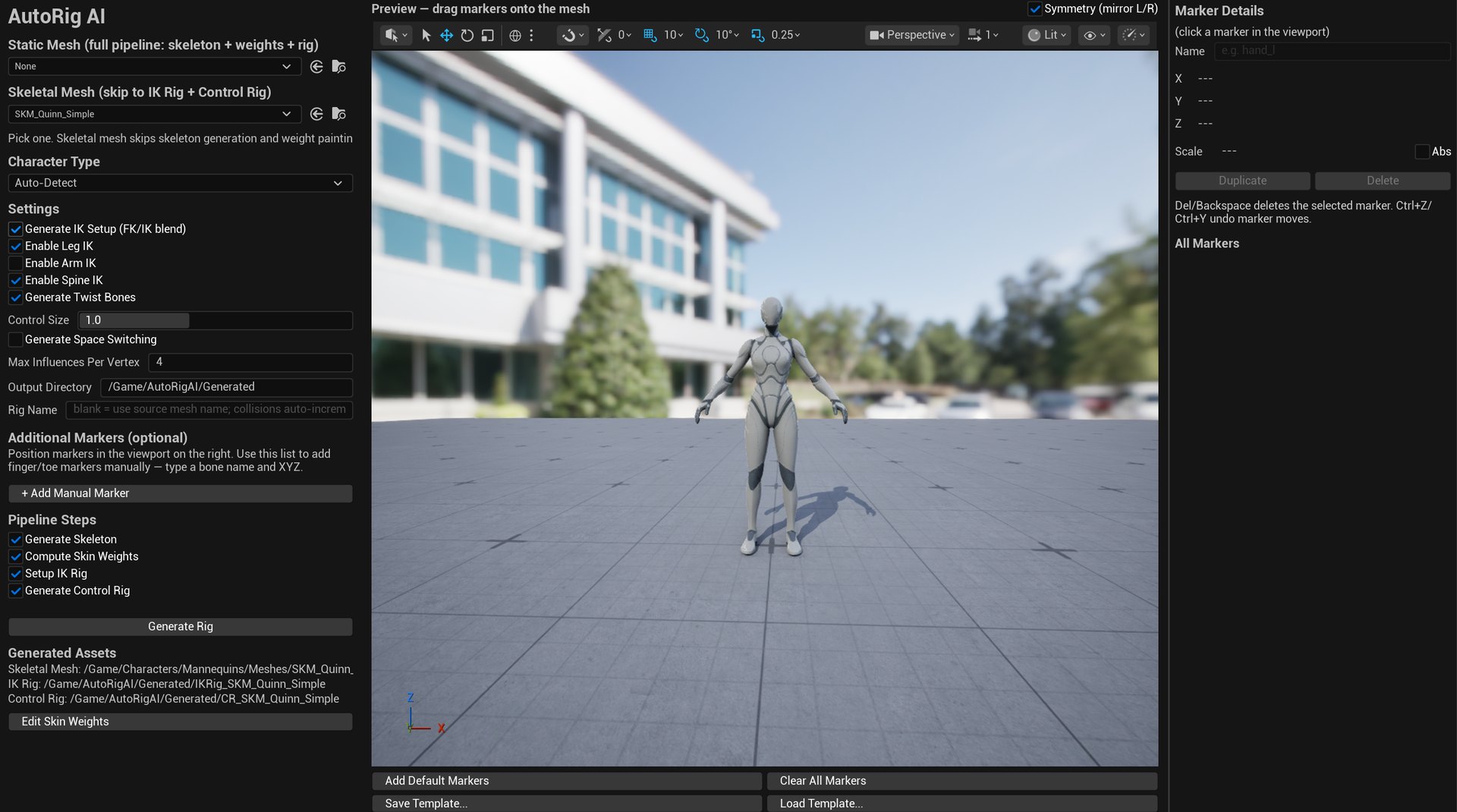
AutoRig AI editor — marker viewport, IK checkboxes, generated assets
Case Study
The Problem
Getting a custom character animatable in Unreal is a long chain: place a skeleton, paint weights, build an IK Rig, wire retarget chains, then author a Control Rig graph. Most of that still happens in a DCC and comes back through FBX. For a mesh that already lives in the editor, the round trip is the expensive part — not the character.
Design Challenge
The plugin has to accept two different starting points without becoming two tools. A static mesh needs a skeleton and weights. A skeletal mesh should not get a second skeleton painted over it. IK has to be optional, because some characters want FK. Automatic joint placement is never complete: fingers and toes still need a human in the viewport. The generated Control Rig also has to follow Mannequin bone axes or none of the engine animation assets will line up.
Key Design Decisions
I put the whole pipeline in one Slate panel with a live preview viewport, not a wizard that hides the mesh. Markers are first-class: drag them onto the mesh, save and load templates, duplicate with symmetry. IK is a set of checkboxes instead of a second product. Static-mesh and skeletal-mesh paths share the same Generate Rig button; the skeletal path skips skeleton generation and weight painting. Graph construction is Python templates (humanoid shipped; other archetypes stubbed) on top of C++ mesh and IK builders, so the editor stays native while the rig graph stays inspectable.
Outcome
A working Unreal 5 editor plugin that produces FK/IK controls, twist bones, spine IK, and aim from a mesh in seconds. The videos are in-editor captures: one shows IK/FK and twist on a skinned mesh, the next adds spine IK and an aim control. The screenshot is the panel after a Quinn run — generated skeletal mesh, IK Rig, and Control Rig paths listed in the same window as the checkboxes that created them.
Technical Highlights
Static or Skeletal Start
Pick a static mesh and run skeleton generation, capsule skin weights, IK Rig, and Control Rig. Pick an already-skinned skeletal mesh and skip to IK Rig plus Control Rig. Same panel, two entry points.
IK as Checkboxes
FK/IK blend, leg IK, arm IK, spine IK, and twist bones are independent options. Turn them off and you get FK. Turn them on and the generated graph includes Two-Bone IK, FABRIK spine, and twist.
Marker Viewport
A preview scene in the editor lets you drag markers onto the mesh. Default markers seed the main joints. Extra markers cover fingers, toes, or anything Auto-Detect should not invent.
Generated Assets
One Generate Rig click writes a skeletal mesh, an IK Rig, and a Control Rig under a chosen output directory. Names increment on collision. Edit Skin Weights stays on the same panel.
In-Engine Graph
Control Rig graphs are built in Unreal, not imported from Maya. Python templates emit FK chains, IK effectors, twist, and aim. C++ handles mesh conversion and the editor module.
Mannequin Convention
Bone axes follow the UE Mannequin +Y convention so generated rigs sit on the same skeleton language as Manny, Quinn, and existing animation assets.